

Selecting the right POS system is crucial—it can either streamline your operations and boost profitability or become a significant roadblock to your business’s success. With countless options available, each offering unique features and pricing models, finding the perfect fit for your business can be overwhelming. Delve into the top restaurant POS solutions that accommodate the distinct requirements of the dining industry and comprehend the considerations necessary for making an informed choice.
In this comprehensive guide, we’ll delve into the top POS systems of 2024, examining their standout features, pricing structures, and user reviews. Whether you’re a small business owner looking for an affordable yet powerful solution or seeking advanced tools to support a growing enterprise, this comparison will help you make an informed decision. Dive into the transformative power of sales transaction systems and discover how the right POS solution can elevate your business operations and profitability.
Curious about which POS system aligns with your business needs? Let’s dive in and explore the best options available today. If you’re looking for guidance on selecting the most suitable option, consider exploring the **top-rated POS systems tailored for small businesses**. Many resources summarize the **best POS system for your small business**, helping you make an informed choice based on your unique requirements and budget.
Lower your delivery costs by 23%
How we reduce costs:
- No delivery vehicle expenses
- Optimized local routes
- Pay-per-delivery model
- Average 23% delivery cost reduction
Comparison of POS Systems: 10 Best POS Systems of 2024
When it comes to finding the best POS systems for small businesses, several names stand out. We’ve tested a range of systems and here are our top picks:
Square
Clover
Vend
Shopify
Revel
Bindo
PayPal
Lightspeed
Helcim
Toast
1. Square POS
Best for small businesses and startups looking for an affordable and user-friendly POS system.
Overview:
Square POS is a highly accessible and cost-effective solution tailored for small businesses and startups. It features a free trial and basic plan that provides essential POS functionalities including sales tracking, inventory management, and customer insights. The system’s user-friendly interface and mobile compatibility allow businesses to manage transactions and operations from anywhere. Square POS integrates seamlessly with other Square services such as payment processing and online store management, creating a cohesive ecosystem for both brick-and-mortar and e-commerce operations. Additionally, Square offers various hardware options and add-ons to scale with business growth. Its no upfront costs and straightforward pricing make it an attractive choice for businesses looking for a reliable, flexible POS system without significant initial investment.
Key Features:
Free Basic Plan
Sales Tracking and Reporting
Inventory Management
Customer Management
Integrated Payments
Online Store Integration
Pros:
No monthly fees for the basic plan
Simple setup and intuitive user interface
Free card reader included
Integrated with other Square services for seamless operations
Cons:
Limited features in the free plan
Extra costs for advanced features and additional hardware
Customer support can be slow and sometimes less responsive
Pricing Details:
Free Plan: Includes essential POS features at no cost
Paid Plans: Start at $60/month for advanced features
Transaction Fees: 2.6% + 10¢ per card swipe, dip, or tap
Known for:
Square POS is renowned for its accessibility and affordability, providing a robust POS solution for small businesses without high upfront costs.
Ideal Users:
Small businesses, startups, and individual entrepreneurs seeking a budget-friendly POS system that is easy to set up and use.
Supported Business Types:
Retailers, restaurants, service-based businesses, and online sellers will find Square’s features adaptable to a wide range of industry needs.
2. Clover POS
Best for businesses seeking customizable POS systems with a variety of hardware options.

Overview:
Clover is cloud based POS system that excels in providing a highly customizable and versatile solution, designed to cater to businesses with specific operational needs. With a range of hardware options including countertop terminals, mobile devices, and self-service kiosks, Clover allows businesses to tailor their POS setup to their unique requirements. The system offers comprehensive features such as advanced inventory management, employee scheduling, and detailed sales reporting. Clover’s modular approach means businesses can enhance functionality through various apps and integrations. While there are higher upfront costs for hardware, Clover’s extensive customization and scalability make it ideal for medium to large businesses and franchises requiring a tailored POS experience.
Key Features:
Customizable Hardware
Employee Management
Advanced Inventory Tracking
Sales Reporting
Customer Relationship Management
Integrated Payments
Pros:
Wide selection of hardware options
Highly customizable and scalable
Comprehensive feature set for diverse business needs
Strong customer support and training resources
Cons:
Higher upfront hardware costs
Monthly fees can be relatively high depending on the plan
Transaction fees vary by payment provider, adding complexity
Pricing Details:
Hardware Costs: Vary based on selection (e.g., from $0 for basic options to $1,000+ for advanced setups)
Monthly Plans: Start at $14.95/month for basic features
Transaction Fees: 2.3% + 10¢ per transaction, varies with payment processor
Known for:
Clover POS is known for its customizability and diverse hardware options, providing tailored solutions for businesses with specific needs.
Ideal Users:
Medium to large businesses with specific operational needs that require a customizable and scalable POS system.
Supported Business Types:
Retail, restaurants, service businesses, and multi-location enterprises will benefit from Clover’s flexible and feature-rich POS solutions.
3. Vend POS
Best for retailers looking for a cloud-based retail POS system with strong inventory management features.
Overview:
Vend POS is designed specifically for retail businesses, offering a powerful cloud-based solution that excels in inventory management and sales analytics. With its cloud-based nature, Vend enables businesses to access their POS system from any device with an internet connection, providing flexibility and real-time updates. The system integrates smoothly with various e-commerce platforms and accounting software, allowing for a unified approach to managing sales both online and offline. Vend’s features include detailed sales reporting, customer loyalty program and management, and multi-store support, making it an ideal choice for retailers seeking a comprehensive and scalable POS system. Its intuitive interface and strong customer support further enhance its value for businesses looking to streamline their retail operations.
Key Features:
Cloud-Based Access
Advanced Inventory Management
Sales Reporting
Customer Management
Integration Capabilities
Multi-Store Support
Pros:
Excellent for inventory management
Cloud-based for remote access and flexibility
Strong integration options with accounting and e-commerce systems
User-friendly interface and strong customer support
Cons:
Limited offline functionality
Higher cost compared to some other POS systems
Additional fees for advanced features and integrations
Pricing Details:
Plans: Start at $99/month
Custom Pricing: Available for enterprise solutions
Transaction Fees: Varies depending on payment processor
Known for:
Vend POS is known for its robust inventory management and cloud-based flexibility, providing a comprehensive solution for retail businesses.
Ideal Users:
Retail businesses with complex inventory and multi-location needs seeking an advanced and flexible POS system.
Supported Business Types:
Retail, multi-store operations and e-commerce businesses will benefit from Vend’s detailed inventory and sales management capabilities.
4. Shopify POS
Best for businesses looking for an integrated e-commerce and POS solution.
Overview:
Shopify POS is designed to seamlessly integrate with Shopify’s e-commerce platform, offering a unified solution for businesses operating both online and in physical locations. This integration allows for consistent inventory management, sales tracking, and customer engagement across all sales channels. Shopify POS features a customizable interface and supports various hardware options, providing flexibility for different business needs. The system is particularly advantageous for businesses already using Shopify for their e-commerce operations, as it simplifies the management of both online and offline sales through a single platform. Shopify POS also includes robust reporting tools and payment processing integration, enhancing its appeal for businesses seeking an all-in-one POS solution.
Key Features:
E-Commerce Integration
Unified Inventory Management
Sales and Customer Reporting
Mobile and Stationary Hardware Options
Customizable POS Interface
Pros:
Seamless integration with Shopify’s e-commerce platform
Unified management of online and offline sales
Scalable with various hardware options
Intuitive and customizable interface
Cons:
Requires a Shopify subscription
Limited offline functionality
Higher cost for advanced features and integrations
Pricing Details:
Basic Plan: Starts at $348/year (Shopify subscription required)
Hardware Costs: Varies based on selection
Transaction Fees: 2.9% + 30¢ per online transaction, varies for in-store transactions
Known for:
Shopify POS is known for its integration with Shopify’s e-commerce platform and unified sales management, providing a cohesive solution for multi-channel businesses.
Ideal Users:
Businesses with both online and physical retail operations seeking a seamless and integrated POS solution.
Supported Business Types:
Retailers, e-commerce businesses, and multi-channel operations will find Shopify POS highly adaptable and effective.
5. Revel POS
Best for large businesses and franchises needing a robust, scalable POS solution.
Overview:
Revel POS offers a comprehensive solution tailored for large-scale operations and franchises, providing advanced tools to manage complex business environments. The system supports multi-location management, making it ideal for businesses that operate multiple sites or franchises. Revel POS includes features such as detailed inventory management, sales reporting, and employee scheduling, all integrated into a single platform. The system’s customizable interface allows businesses to adapt the POS experience to their specific needs, whether in retail, restaurants, or other sectors. Revel also provides extensive customer support and training resources, ensuring businesses can effectively implement and leverage the system. With its scalability and powerful features, Revel POS is well-suited for enterprises seeking a robust and adaptable POS solution.
Key Features:
Multi-Location Support
Advanced Inventory Management
Detailed Reporting and Analytics
Employee Management
Customizable Interface
Integrated Payments
Pros:
Highly scalable for large operations
Extensive feature set for advanced needs
Strong support for multi-location management
Customizable to fit various business models
Cons:
Higher cost compared to other systems
Complex setup and implementation
Requires training for advanced features
Pricing Details:
Custom Pricing: Based on business size and requirements
Hardware Costs: Additional
Transaction Fees: Varies depending on payment provider
Known for:
Revel POS is known for its robust, scalable features and support for multi-location businesses, offering a comprehensive solution for large enterprises.
Ideal Users:
Large businesses, franchises, and enterprises need a powerful and scalable POS system with extensive features.
Supported Business Types:
Retail, restaurants, and multi-location operations will benefit from Revel’s advanced capabilities and scalability.
6. Bindo POS
Best for small to medium-sized retailers seeking an affordable and straightforward POS system.

Overview:
Bindo POS is a cost-effective and user-friendly solution designed for small to medium-sized retailers. The system offers essential retail POS and features such as inventory management, sales reporting, and customer management through an intuitive and straightforward interface. Bindo POS operates on a cloud-based platform, providing businesses with access to their data from any device with an internet connection and ensuring real-time updates. While it may lack some of the advanced features of higher-end systems, Bindo’s affordability and ease of use make it an attractive option for businesses that require reliable POS functionality without complexity. The system also includes mobile compatibility, allowing businesses to process transactions and manage operations on the go.
Key Features:
Cloud-Based Platform
Inventory Management
Sales Reporting
Customer Management
Mobile Compatibility
Pros:
Affordable and cost-effective
Easy to set up and use
Cloud-based for remote access
Mobile compatibility for on-the-go transactions
Cons:
Limited advanced features
Basic hardware options
Less suitable for large-scale or complex operations
Pricing Details:
Plans: Start at $49/month
Hardware Costs: Varies
Transaction Fees: 2.75% per transaction
Known for:
Bindo POS is known for its affordability and user-friendly design, providing essential POS functionality at a competitive price.
Ideal Users:
Small to medium-sized retailers seeking a straightforward and cost-effective POS system.
Supported Business Types:
Retail businesses require a simple and reliable POS solution.
7. PayPal POS
Best for businesses seeking a straightforward POS solution with integrated payment processing.

Overview:
PayPal POS delivers a simple and cost-effective POS solution with seamless integration into PayPal’s payment processing ecosystem. This system is particularly suited for small businesses and independent sellers who value simplicity and low cost. PayPal POS offers essential functionalities such as sales tracking, inventory management, and transaction processing without monthly fees, operating on a pay-per-transaction model. The integration with PayPal’s payment services ensures efficient and straightforward payment processing. While the system may not offer the advanced features found in more complex POS solutions, its affordability and ease of use make it a practical choice for businesses focused on basic POS needs and cost control.
Key Features:
Integrated PayPal Payment Processing
Sales Reporting
Inventory Management
Mobile and Tablet Compatibility
No Monthly Fees
Pros:
No monthly fees; pay-per-transaction model
Easy integration with PayPal
Simple setup and user-friendly interface
Cost-effective for small businesses
Cons:
Limited advanced features
Basic inventory management tools
Transaction fees apply and can add up
Pricing Details:
No Monthly Fees: Pay only per transaction
Transaction Fees: 2.7% per transaction
Hardware Costs: Varies based on choice
Known for:
PayPal POS is known for its integration with PayPal’s payment processing and straightforward pricing model, offering an accessible POS solution with no monthly fees.
Ideal Users:
Small businesses, and independent sellers seeking a basic, cost-effective POS system with integrated payment processing.
Supported Business Types:
Retail, service businesses, and online sellers require a simple and integrated POS system.
8. Lightspeed POS
Best for retail and restaurant businesses needing a versatile and feature-rich POS system.

Overview:
Lightspeed POS is a versatile and feature-rich system designed to meet the needs of both retail and restaurant businesses. It offers extensive tools for managing inventory, sales, and customer relationships, with advanced features tailored to diverse business requirements. Lightspeed’s support for multi-location setups makes it ideal for businesses with multiple locations, stores or branches. The system’s cloud-based architecture allows for real-time data access and seamless integration with various third-party applications. With features such as detailed sales reporting, customer management, and robust inventory controls, Lightspeed POS provides a comprehensive solution that scales with business growth. Its flexibility and depth of features make it a strong choice for businesses seeking a powerful and adaptable POS system.
Key Features:
Retail and Restaurant-Specific Tools
Advanced Inventory Management
Sales Reporting and Analytics
Customer Relationship Management
Multi-Location Support
Integration with Third-Party Applications
Pros:
Comprehensive feature set for various business types
Strong inventory management and reporting tools
Cloud-based for remote access and flexibility
Excellent customer support
Cons:
Higher cost compared to some other POS systems
Learning curve due to the extensive feature set
Customization options may be overwhelming for smaller businesses
Pricing Details:
Plans: Start at $69/month
Hardware Costs: Varies based on selection
Transaction Fees: Varies depending on payment provider
Known for:
Lightspeed POS is known for its versatility and extensive feature set, providing advanced solutions for retail and restaurant businesses.
Ideal Users:
Retail and restaurant businesses of various sizes seeking a comprehensive and adaptable POS system.
Supported Business Types:
Retail, restaurants and multi-location operations will benefit from Lightspeed’s extensive features and scalability.
9. Helcim POS
Best for businesses looking for a transparent, payment-integrated POS system with flexible pricing.

Overview:
Helcim POS is a transparent and flexible POS solution designed to integrate seamlessly with Helcim’s payment processing services. This system is well-suited for businesses that prioritize straightforward pricing and integration with payment processing. Helcim POS offers robust features including inventory management, sales reporting, and customer engagement tools. Its cloud-based architecture provides businesses with remote access to their data, enabling real-time updates and management. Helcim’s pricing model is notable for its transparency and lack of hidden fees, offering businesses a clear understanding of costs. The system is also highly customizable, allowing businesses to tailor their POS experience to specific needs. Overall, Helcim POS is a solid choice for businesses seeking an integrated and transparent POS solution.
Key Features:
Integrated Payment Processing
Cloud-Based Access
Inventory Management
Sales Reporting and Analytics
Customer Management
Customizable Interface
Pros:
Transparent pricing with no hidden fees
Seamless integration with Helcim’s payment processing
Flexible and customizable
Cloud-based for remote access
Cons:
Limited hardware options compared to other systems
May lack some advanced features of higher-end POS solutions
Transaction fees vary depending on the payment provider
Pricing Details:
Plans: Pricing available upon request
Hardware Costs: Varies
Transaction Fees: Starts at 2.6% + 10¢ per transaction
Known for:
Helcim POS is known for its transparent pricing and seamless integration with payment and credit card processing, offering a straightforward POS solution.
Ideal Users:
Small to medium-sized businesses looking for an integrated and transparent POS system with flexible pricing.
Supported Business Types:
Retail, service businesses, and restaurants will benefit from Helcim’s flexible and integrated POS features.
10. Toast POS
Best for restaurants needing a comprehensive and restaurant-focused POS system.

Overview:
Toast POS is a comprehensive and restaurant-focused POS system designed to meet the unique needs of the food service industry. It offers a range of features specifically tailored for restaurants, including table management, menu customization, and advanced reporting tools. Toast POS is cloud-based, providing real-time access to sales data and inventory management from any location. The system’s integration with kitchen display systems and online ordering platforms enhances operational efficiency and customer service. Toast also includes robust support and training resources, ensuring that restaurant staff can effectively use the system. With its focus on the restaurant industry, Toast restaurant POS system provides a tailored and efficient solution for managing both front-of-house and back-of-house operations.
Key Features:
Restaurant-Specific Features (e.g., table management, menu customization)
Cloud-Based Access
Integrated Online Ordering
Kitchen Display Systems
Sales Reporting and Analytics
Employee Management
Pros:
Tailored specifically for the restaurant industry
Robust features for table and order management
Seamless integration with online ordering and kitchen display systems
Strong customer support and training resources
Cons:
Higher cost compared to some other POS systems
May have more features than needed for smaller establishments
Hardware requirements can add to the overall cost
Pricing Details:
Plans: Pricing available upon request
Hardware Costs: Varies based on selection
Transaction Fees: Varies depending on payment provider
Known for:
Toast POS is known for its restaurant-focused features and comprehensive management tools, offering a tailored solution for food service businesses.
Ideal Users:
Restaurants and food service businesses seeking a specialized POS system designed for the unique needs of the industry.
Supported Business Types:
Restaurants, cafes, bars, and other food service establishments will benefit from Toast’s extensive restaurant-focused features.
What Is a Point-of-Sale System?
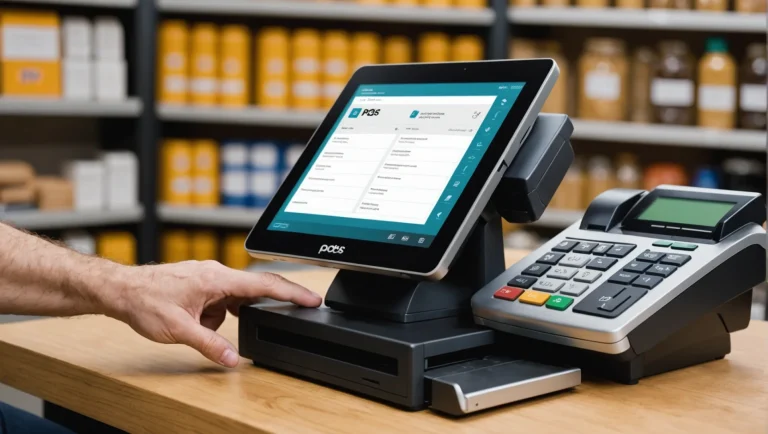
A Point-of-Sale (POS) system is a combination of hardware and software that allows businesses to complete sales transactions, manage inventory, track customer data, and streamline operations. At its core, a POS system processes sales by calculating the total amount, processing payments, and issuing receipts. However, modern POS systems have evolved far beyond simple transaction processing; they now serve as the central hub for business operations. This includes managing inventory levels, tracking employee performance, generating detailed sales reports, and integrating with other business tools like accounting software and CRM systems. Whether used in retail stores, restaurants, or service-based businesses, a good POS system further enhances efficiency, accuracy, and overall customer experience. Discover how incorporating touch-free payments into your POS system not only modernizes your transaction process but also provides an added layer of convenience and safety for both your business and your customers.
How To Choose the Best POS System
Selecting the right POS system for your business requires careful consideration of several factors:
Business Type and Needs: Determine what features are most critical for your business. Retail businesses might prioritize inventory management, while restaurants may need table management and kitchen display systems.
Ease of Use: A user-friendly interface is essential, especially for businesses with high employee turnover. Choose a system that requires minimal training and can be quickly adopted by your team.
Scalability: Consider your future growth. Select a POS system that can scale with your business, offering additional features and integrations as you expand.
Integration Capabilities: Ensure the POS system integrates seamlessly with your existing tools, such as accounting software, e-commerce platforms, and payment gateways.
Cost: Evaluate both upfront and ongoing costs, including hardware, software subscriptions, and transaction fees. Choose a system that offers the best value for your budget.
Customer Support: Reliable customer support is crucial for minimizing downtime during technical issues. Opt for a POS provider known for responsive and helpful support.
POS Software Features
The software component of a POS system offers various features that can significantly enhance business operations. Key POS software features include:
Sales and Transaction Management: Facilitates quick and accurate processing of sales, including cash, credit card, and mobile payments.
Inventory Management: Tracks stock levels in real-time, alerts for low inventory, and automates reordering processes.
Customer Relationship Management (CRM): Stores customer data, tracks purchase history, and enables targeted marketing efforts like loyalty programs.
Reporting and Analytics: Generate detailed reports on sales, inventory, and employee performance, helping businesses make data-driven decisions.
Employee Management: Monitors employee hours, tracks sales performance, and manages permissions and access levels.
Multi-Channel Integration: Integrates with online stores, allowing seamless management of in-store and e-commerce operations from a single platform.
POS Hardware Features
The hardware component of a POS system is essential for facilitating in-person transactions. Key POS hardware features include:
Touchscreen Terminals: User-friendly interfaces for processing transactions, often with customizable layouts for different business needs.
Receipt Printers: A receipt printer is essential for providing customers with purchase receipts, available in various formats such as thermal or impact printers.
Barcode Scanners: Speeds up the checkout process by quickly scanning product barcodes, reducing errors, and improving efficiency.
Cash Drawers: Secure storage for cash transactions, often connected to the POS system for automated opening and closing during sales.
Card Readers: Devices that process credit and debit card payments, including chip, swipe, and contactless (NFC) options.
Kitchen Display Systems (KDS): For restaurants, these screens display orders in the kitchen, streamlining communication between front-of-house and back-of-house staff.
Types of POS Systems
POS systems come in various types, each catering to different business needs:
Traditional POS Systems: Installed on a local server, these systems are often found in large retail stores and restaurants. They offer robust features but require significant upfront investment and maintenance.
Cloud-Based POS Systems: These systems store data in the cloud, allowing for remote access and easier updates. They are typically more affordable and scalable, making them popular among small to medium-sized businesses.
Mobile POS Systems: Utilized on smartphones or tablets, mobile POS systems are ideal for businesses that need flexibility, such as food trucks, pop-up shops, or service-based businesses.
Self-Service Kiosks: Often found in quick-service restaurants or retail stores, these kiosks allow customers to place orders or make purchases independently, reducing wait times and labor costs.
Hybrid POS Systems: Combining the reliability of traditional systems with the flexibility of cloud-based solutions, hybrid POS systems offer the best of both worlds, making them suitable for businesses with complex needs.
How Much Does a POS System Cost?
The cost of a POS system varies depending on the features, hardware, and type of system you choose. Here’s a breakdown of the best point-of-sale systems and potential costs:
Software Costs: Monthly subscription fees range from $29 to $299, depending on the features and the provider. Some providers also offer custom pricing for large enterprises.
Hardware Costs: Hardware expenses can include touchscreen terminals, receipt printers, barcode scanners, and card readers. A complete setup can range from $300 to $2,000.
Transaction Fees: Most POS systems charge a percentage of each transaction, typically ranging from 1.5% to 3% per sale, depending on the payment processor.
Installation and Setup Fees: Some systems may require professional installation, with fees ranging from $500 to $1,000.
Ongoing Maintenance and Support: Consider the cost of software updates, customer support, and potential repairs or replacements of hardware over time.
How To Use a POS System
Using a POS system effectively involves several key steps:
Set Up Your System: Begin by installing the software on your hardware devices, such as terminals and tablets. Configure the system by inputting your product catalog, pricing, and any necessary tax information.
Train Your Staff: Ensure that all employees are trained on how to use the POS system, including processing sales, managing inventory, and handling customer data. Many systems offer training modules or customer support to assist with this process.
Process Transactions: Use the POS system to complete sales by scanning items, applying discounts if necessary, and processing payments via cash, card, or mobile payment methods.
Manage Inventory: Keep track of inventory levels in real-time, set up automatic reorder points, and monitor stock movement to prevent shortages or overstocking.
Analyze Sales Data: Utilize the reporting features to generate insights into sales trends, peak hours, and employee performance. Use this data to optimize business operations and make informed decisions.
Integrate with Other Systems: Connect your POS system with other business tools such as accounting software, CRM, and e-commerce platforms to streamline operations and maintain consistency across channels.
Maintain and Update: Regularly update your POS software to access new features, security patches, and improvements. Also, ensure that hardware components are functioning correctly and replace them as needed.
Making the Right Choice for Your Business
Choosing the right POS system is a critical decision that can significantly impact your business’s efficiency, customer loyalty and satisfaction, and profitability. Throughout this guide, we’ve explored leading options like Square, Clover, and Vend—each offering distinct advantages, from user-friendly interfaces to advanced, feature-rich platforms, all at varying price points. Explore the benefits of increasing operational flexibility and enhancing the customer experience with a portable POS system in your business.
The right POS system can do more than just process transactions; it can streamline your operations, elevate the customer experience, and ultimately drive your business’s growth. As you consider your options, reflect on what your business needs most: Is it the flexibility to scale as you grow, the depth of features to handle complex operations or a cost-effective solution that offers excellent value?
Now that you’re equipped with the insights from our comparison, the next step is to identify the features that will make the most significant impact on your business. What aspects are you most eager to implement to take your operations to the next level? For businesses considering a new payment system, understanding the intricacies of retail payment processing is essential. This not only helps in making an informed choice but also ensures that the selected system integrates well with your existing operations. To dive deeper into the nuances of payment processing in retail, check out this comprehensive guide on retail payment processing and discover how to optimize your transaction processes.
In light of evolving business needs, it’s crucial to also consider the emerging features required in retail POS systems. As we look forward to 2025, businesses should focus on integrating innovative functionalities that enhance their operational efficiency. To gain insights into these developments, check out the essential features for retail POS systems for 2025 that can streamline processes and improve customer experiences.