



Did you know that in 2025, only 3% of YouTube channels reach 1,000 subscribers?
Yet some channels hit this milestone in weeks, while others struggle for years. The difference? It’s not luck, talent, or even content quality. It’s data.
Most content creators spend hours perfecting their videos but minutes reviewing their YouTube analytics. This is backward. Your YouTube analytics hold the key to understanding what works, what doesn’t, and most importantly: why.
YouTube’s algorithm processes over 500 hours of video uploads every minute. Standing out requires more than good content – it demands strategic decisions based on solid data. Think of YouTube Analytics as your channel’s GPS. Without it, you’re just hoping to reach your destination.
This guide breaks down the exact process to turn your YouTube Analytics into actionable insights. You’ll learn:
-
How to spot viewer patterns in your reporting period that signal viral potential
-
Which metrics, such as average percentage watched and views, matter for channel growth
-
Simple ways to double your click-through rate by optimizing video titles and thumbnails
-
Advanced techniques to increase watch time and keep viewers subscribed
The path to YouTube success is in your data. From analyzing the total number of views to refining your annotations and shares, let’s decode your YouTube analytics together.
Lower your delivery costs by 23%
How we reduce costs:
- No delivery vehicle expenses
- Optimized local routes
- Pay-per-delivery model
- Average 23% delivery cost reduction
Leveraging YouTube Analytics: Maximize Your YouTube Channel’s Potential
-
YouTube Studio helps grasp audience insights.
-
Watch time, CTR, and engagement metrics are key.
-
Optimize content with data-driven tweaks.
1. Access and Set Up YouTube Analytics
There are over 2.5 billion users engaging with YouTube every month. These users generate an immense amount of data every second. To tap into these, start by logging into YouTube Studio. Click on the ‘Analytics’ tab. Customize this dashboard to reflect what’s important to you. You might redirect your focus to video performance metrics or audience demographics.
Creating a user-friendly dashboard can streamline your process. As you spruce up your dashboard, remember that clarity is key. Events like new uploads or viewer spikes can alert you to what’s working. By monitoring these signals, you can adjust your approach quickly.
2. Interpreting YouTube Metrics
Understanding key metrics is crucial. YouTube metrics can be daunting, but they aren’t insurmountable. Watch time and audience retention indicate how long users stay engaged. Watch time, in particular, is essential because it impacts video reach. To complement your content creation efforts, utilizing the right tools can vastly enhance video quality and engagement. One essential aspect of successful video production is mastering video editing. Familiarizing yourself with top-notch video editing software can make your content stand out. For those looking to explore various options, check out our comprehensive guide on the best video editing software.
Retention Rates: A good audience retention rate is usually more than 20%. However, the average rate can range between 35% and 40%. This provides a reality check on performance.
Click-through rate (CTR) measures how often people click your video after seeing it. Traffic sources show where your viewers come from. Explore demographic data to better understand your audience. Targeting your content to specific groups is a great first step. This helps in refining your messaging and presentation for maximum reach. For those looking to enhance their YouTube presence specifically for business, there are tailored strategies that can significantly increase traffic. Resources like our post on optimizing your YouTube Channel for Business delve into effective tactics to leverage your channel for growth in 2025.
Investing in smart YouTube marketing is crucial for creators who want to not only grow their audience but also convert views into sales. With an effective strategy, you can dramatically enhance both visibility and engagement, leading to increased revenue. For more on leveraging YouTube for business success, check out our post on effective strategies for YouTube marketing.
Designing striking thumbnails is vital for capturing viewer attention on YouTube. The appearance of your video often decides whether viewers choose to click on it. By utilizing bright colors, clear text, and relevant imagery, creators can significantly improve their video CTR. For those interested in mastering this skill, check out our guide on crafting captivating YouTube thumbnails for successful engagement.
3. Optimizing Viewer Engagement
Identify videos with high engagement. Look for patterns like thumbnail design, video length, and content style. These insights can highlight what keeps your audience glued. Engagement metrics are an effective guide for refining content delivery. They help you improve call-to-actions (CTAs) too.
For instance, if shorter videos hold attention better, that might be the direction to take. Craft end speeches that prompt viewers to act. It could be subscribing, commenting, or visiting another video. Audiences generally respond positively when asked to engage in particular ways.
Average YouTube Engagement Rates
Overall Engagement Rate: The average engagement rate on YouTube has been reported at 3.87% for the most recent period.
By Channel Size: Engagement rates vary by channel size; for example, channels with 100,000 to 1 million followers have an average engagement rate of 3.47%.
Content Strategy Enhancement: Improve Your Video Output
Know when your audience is online to boost interactions.
Align video themes with what interests your viewers.
Effective scheduling can help attract more viewers.
1. Schedule Content Based on Audience Data
Your audience’s activity timing is crucial to optimize engagement. Actionable steps ensure you are releasing videos when your audience is most likely to be online.
Recognize Peak Times: Use YouTube Analytics to learn when your audience is online. Usually in YouTube Studio, under the “Audience” tab, you’ll find graphs showing the most active times for your viewers. This is typically when your content has the highest chance of getting noticed.
Plan Releases: Start planning your videos to match these periods. If you notice users are most active at 5 PM, schedule your content to publish around that time. Ensure consistency in your schedule to set audience expectations.
Experiment with Timing: If unsure about the exact timing, experiment with different release times. Make small adjustments and monitor the views, likes, and comments you get from these trial runs. You’ll soon notice a pattern about which timings yield better engagement.
Monitor and Adjust: Regularly revisit the analytics. Audience activity patterns might change over time. Continuous monitoring allows adjustments to your release schedule as needed.
2. Use Data to Plan Future Content
Creating content that resonates with your audience is essential for growth. The following steps guide using data to plan your next videos.
Identify Trends: Look at your most viewed videos. Identify patterns or themes that seem to spark interest. You might spot topics like tutorials, reviews, or interviews that drive more traffic.
Draft a Content Calendar: Establish a calendar based on recurring successful topics. Plan content around these themes. A calendar ensures you don’t overlook important trending topics, fostering a consistent content flow.
Incorporate Viewer Feedback: Use the comments section and community posts to gather feedback on what the audience wants. Direct feedback provides insights that numbers might not.
Anticipate Trends: Stay updated with industry news and collaborate with creators to foresee upcoming trends. This allows you to create relevant content just as interest peaks.
Reassess Regularly: Re-evaluate your content calendar and trends periodically. As your channel and audience grow, preferences might shift. Regular checks keep your content aligned with audience interests.
In video content, aligning both timing and topics with data enhances your ability to attract and keep viewers. As Jonathan Perelman puts it, “Content is king, but distribution is queen. And she wears the pants.” Ensure your hard-earned content reaches and resonates with viewers effectively.
By using this approach, expect not just to engage a loyal viewership but also to maximize organic growth by spreading your channel further.
Improving Video Ranking to Gain More Visibility
Use keyword-rich titles and detailed descriptions.
Test different thumbnail styles for better visibility.
Enhance discoverability through effective video optimization.
Enhance Your Video Titles and Descriptions
Creating effective video titles and descriptions is key to improving search engine presence. The first task is to make sure your titles include important words people use when searching for content like yours. This could include specific topics or popular phrases related to your video content. Make sure these titles are not too long, often around 60 characters is a good limit as longer titles might not fully display in search results.
Next, focus on your video descriptions. Descriptions should be detailed but straightforward. Explain what the video covers and why it matters. Include relevant tags and keywords but integrate them naturally so it doesn’t feel forced. Adding timestamps within descriptions helps viewers to navigate your content quickly. YouTube users are more likely to click on videos that promise clear and useful information.
Adding Strategic Tags
Include tags that are descriptive of your video’s content. Tags help associate your video with similar content, broadening its reach. Use a mix of broad and specific tags. This will ensure that the video is discovered by a wide yet relevant audience.
Create Compelling Thumbnails
Your video’s thumbnail is the first impression for most viewers. Design a thumbnail that captures the essence of your video. Use engaging visuals and vibrant colors, keeping it coherent with your video content. Thumbnails should include minimal text but make sure the font is easy to read even on small screens.
Testing different thumbnail styles can boost viewer interest significantly. Monitor which thumbnails achieve higher click-through rates (CTR) over time. A good CTR can influence YouTube’s video recommendation system positively, increasing your video’s visibility on the platform. Make necessary adjustments based on the data collected.
Analyzing Thumbnail Performance
Use YouTube Analytics to track how different thumbnail designs impact viewer engagement. Regular reviews can help refine your design approach for better performance.
YouTube CTR Benchmark: A report mentioning that 50% of YouTube channels have a 2-10% CTR suggests setting realistic goals for improvement.
Optimize Video Content for SEO
Beyond titles and thumbnails, optimizing your video content itself is crucial. Anchor words and phrases, used naturally within your video, should reflect the keywords in your title and description. However, striking a balance is essential to avoid excessive keyword stuffing.
Ensure any text included in the video, like subtitles and closed captions, is correct and aligned with your keywords. Subtitles are helpful not just for diverse audiences who may speak different languages but also for improving accessibility. Maintaining high-quality and engaging content will keep viewers watching longer, enhancing your channel’s performance.
Significant Organic Traffic: Video content boosts organic traffic from SERPs by up to 157%.
Proper Use of Cards and End Screens
Integrate YouTube cards and end screens to enhance viewer interaction and retention. Cards can promote other content on your channel or link to external sites, while end screens guide viewers to additional videos. Placing these toward the final segment keeps the audience engaged without interrupting their viewing experience.
By following these steps, you’ll not only improve the ranking of your videos but also broaden their exposure on YouTube. Enhanced visibility means more opportunities for engagement, leading to a successful channel.
Advanced Tips for Optimizing Viewer Engagement
Balance video length for optimal engagement.
Encourage viewer interaction with live Q&As.
Watch out for misleading titles and improve content.
Additional Advice or Alternative Methods
Experiment with Video Playbacks
Finding the optimal video length is critical for maintaining viewer interest. Too short, and viewers may feel like important content is missing. Too long, and they may lose interest. Creators should deliver detailed content without stretching the viewer’s attention span too thin.
Optimal YouTube Video Length: C-istudios notes that on YouTube, videos between 7-15 minutes tend to achieve higher engagement.
Experimentation is key. Use YouTube Analytics to see how different lengths perform. Divide your content into varying durations and observe which length retains more viewers. Stay flexible; adjust based on performance. There’s no one-size-fits-all, as audience preferences vary by niche. Consider industry reports or platforms like Wistia that provide insights on how video length impacts viewer engagement in your field. Books like “YouTube Secrets” by Sean Cannell and Benji Travis offer further insights on tailoring video content to boost engagement effectively.
Viewer Retention for Short Videos: Videos under 1 minutes achieve an impressive 75% viewer retention rate.
Host Live Q&A Sessions
Engaging directly with your audience transcends conventional content delivery. Hosting live Q&A sessions encourages real-time interaction and provides immediate feedback from viewers. This interaction fosters a sense of community and personal connection, enhancing viewer loyalty.
Implementing such sessions requires planning. Announce these events ahead of time to boost attendance. Use interactive features, like live polls or question stickers, encouraging instant interaction. After the session, analyze the questions asked. These can guide future content or reveal gaps in current offerings. Consider integrating platforms like StreamYard for seamless live broadcasts. Books like “Streaming Media Demystified” by Joe Follansbee provide a deep dive into utilizing live sessions effectively.
Common Pitfalls and How to Avoid Them
Avoid Clickbait Titles
While intriguing titles attract viewers, they’re a double-edged sword. Misleading titles can result in audience disillusionment, leading to lower retention rates and diminished trust. Ranked data show that clickbait titles can harm your long-term engagement metrics. Aim for creative yet honest titles. They should reflect the content accurately. For instance, using humor or intriguing questions can draw interest without misleading.
Monitoring audience retention through YouTube Analytics helps detect deceptive practices early. If you notice an unusual drop-off, assess if your title aligns with content expectations. Adjust as necessary and adopt a transparent approach, emphasizing value over views. Consider resources like “The YouTube Formula” by Derral Eves for a structured approach to crafting effective video titles.
Monitor Audience Drop-Off Points
Understanding when your audience loses interest during a video is paramount. High drop-off rates indicate that your content isn’t holding viewer interest. Tools like YouTube Analytics allow you to see exact drop-off points, indicating content sections that need revision or removal.
Analyzing these points involves digging deeper into viewer feedback and behavioral patterns. Were there unnecessary tangents? Did the pacing slow? Solutions might involve quicker transitions, more engaging visuals, or better storytelling. Reading materials like the book “Storyworthy” by Matthew Dicks can offer strategies to maintain captivating narratives throughout your video.
Encourage Viewer Interaction
One of the best indicators of viewer engagement is interaction. Christian Somcio, Head of Partnerships at ContactOut, highlights how “The number of comments and votes you receive tells you that your viewers do more than simply watch your video and move on to something else.” Fostering such engagement involves inviting comments, promoting discussions, and responding promptly to viewer interactions.
Encourage interaction by asking questions at the end of your video or conducting polls. Create content that sparks debate or resonates personally with viewers, prompting them to share thoughts. Analyze which types of prompts yield more interactions, allowing you to refine your approach. Dive deeper into strategies with “Crush It!” by Gary Vaynerchuk, emphasizing interactive marketing’s role in modern content creation.
Troubleshooting Common Issues
Identify sudden viewership drops using data tools.
Test multiple thumbnails to increase CTR.
Quick fixes lead to better performance and insights.
Solutions to Potential Problems
Analyze and Address Sudden Drops in Viewership
Sudden drops in viewership can occur for various reasons. First, ensure that you’re using YouTube Analytics to track viewership trends over time. It’s essential to compare the data from a specific period with previous ones. Look for the peaks and valleys to identify any patterns. If a discrepancy is present, dig deeper into the data for the affected videos specifically.
Check Recent Content: Examine recent video uploads since before the drop. Look for changes in topic, format, or style that might have negatively impacted viewer interest.
Review Audience Feedback: Go through viewer comments and feedback. They often indicate what aspects are lacking or need improvement. Responding to comments can provide insights into viewers’ perspectives and boost engagement.
Evaluate External Factors: Consider external factors like trending events or seasonal changes. These might inadvertently influence viewer behavior. Adjust your content calendar accordingly if external factors align with the drop.
Study Competitor Channels: Watch competing channels with a similar audience to assess if they’re experiencing the same trends. If competitors are growing while your viewership declines, analyze what sets their content apart.
Run a Diagnostic Test: Try uploading a video similar in style and content to previous high-performing ones. Monitor analytics closely to see if this video performs better.
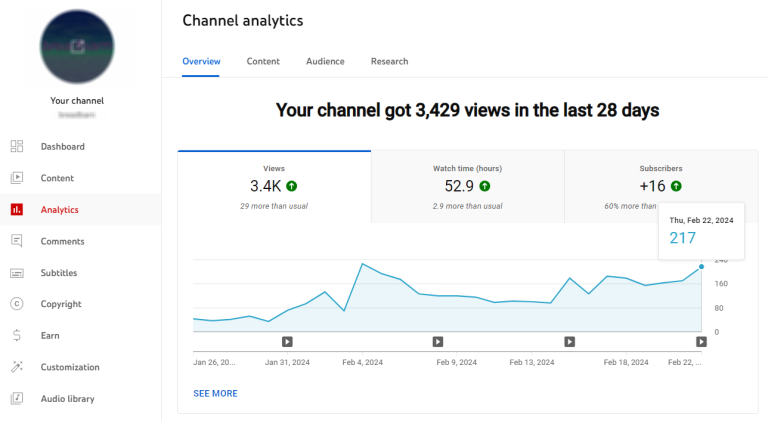
Addressing these steps thoroughly can often pinpoint the root cause, allowing for timely adjustments.
Resolve Issues with Low CTR by Testing Thumbnail Variations
A low Click-Through Rate (CTR) suggests viewers aren’t enticed enough by your thumbnails. Testing different thumbnail designs can significantly impact CTR and viewership.
Gather Current Thumbnails: Collect current thumbnails for videos with low CTRs. Note any common design elements and patterns. High-contrast colors and readable text often perform well.
Experiment with New Designs: Create multiple new variations for each thumbnail. This could include changing the image focus, colors, text, or layout. Use A/B testing methods through YouTube’s video features, which let you compare performance between versions.
Use Data-Driven Insights: Check YouTube’s “Click-Through Rate” data against each thumbnail variation. Determine the elements that most affect viewer decisions to click.
Incorporate Viewer Preferences: Sometimes, involving your audience in the decision-making process pays off. Create a poll asking for feedback on which thumbnails they prefer or find engaging.
Monitor and Adjust: After implementing a new thumbnail, closely monitor the results over a week or two. Use this data to inform future thumbnail strategies or make necessary changes.
Evaluate Title Consistency: Ensure titles accurately reflect the thumbnail’s promise. A misleading mismatch can discourage viewers and affect CTR negatively.
Average YouTube CTR: On YouTube, the overall CTR benchmark is 0.65%, which is lower than Facebook but higher than LinkedIn.

Following these steps will help in crafting thumbnails that resonate more effectively with your target audience, driving higher engagement.
These solutions for common issues can help in making quick but impactful changes. Each strategy uses data to understand what truly affects viewer behavior, leading to better insights.
Further Resources and Reading
-
Expand your YouTube knowledge with advanced guides.
-
Boost video editing skills for better content.
-
See why understanding analytics is key to growth.
Related Topics or Advanced Guides
To truly excel on YouTube, digging deeper into related topics can provide crucial insights. Consider enrolling in courses that focus on advanced YouTube strategies. These courses often cover more than just basic uploading and tagging. They delve into complex algorithm behaviors, audience-building techniques, and monetization strategies. For instance, online platforms like Coursera or Udemy offer detailed courses led by industry experts, providing both beginners and experienced creators with new tactics.
In parallel, enhancing your video editing skills with tools like an AI video maker can transform the way you deliver content. Articles and books that focus on storytelling, cutting-edge editing software, and visual effects can be game-changers. Books like “The Filmmaker’s Handbook” by Steven Ascher provide comprehensive guidance on crafting visually appealing videos. These resources enable creators to blend creativity with technical prowess, appealing to a broader audience.
Why This Skill/Task Matters
In the digital world, understanding YouTube analytics is not just an option but a necessity. It’s a leading factor behind strategic channel growth. Data like watch time and demographic insights guide effective content strategies. Focusing on these metrics allows channels to adapt in real time, ensuring they meet viewer expectations. Consider that YouTube has over 2.5 billion monthly active users. Understanding what these users seek can significantly influence your channel’s trajectory.
Enhancing content based on data also sustains viewer interest. Viewers are more likely to stay engaged when content aligns with their preferences. By regularly analyzing what works and what doesn’t, creators can evolve their content strategies to match audience expectations, translating to higher watch time and subscriber count. As Jeff Sauer aptly puts it, “For every $20 you spend on web analytics tools, you should spend $80 on the brains to make sense of the data.”
Conclusion
YouTube’s data offers clear paths to channel growth in 2025. The numbers tell stories about your audience – when they watch, what they like, and how they interact. These insights are your compass for making informed decisions in your YouTube channel.
Success on YouTube isn’t random. By checking your YouTube analytics daily, you’ll spot patterns in viewer behavior, such as average view duration and average percentage of videos watched. High-performing videos show what works. Low-performing ones highlight areas for improvement. Each data point, including total views and subscriber count, guides your next move.
Start small. Pick one metric to improve this week. Maybe it’s watch time, click-through rate, or increasing the number of subscribers. Track changes as you adjust your content. Make notes about what works and what type of content your audience prefers. Build on your successes.
Remember: YouTube analytics aren’t just numbers – they represent real people who choose to spend time with your content. Your viewers’ behavior patterns, whether they are subscribed or unsubscribed, are valuable feedback. Use this feedback to create videos that serve your audience better.
Take action now. Open your YouTube Studio. Look at your last video’s performance report. Find one thing you can improve in your next upload, such as improving annotations or increasing shares. That’s how channels grow – one data-driven decision at a time.
Your analytics dashboard is waiting. Your audience is waiting. It’s time to turn those insights into action and boost your YouTube channel’s growth.