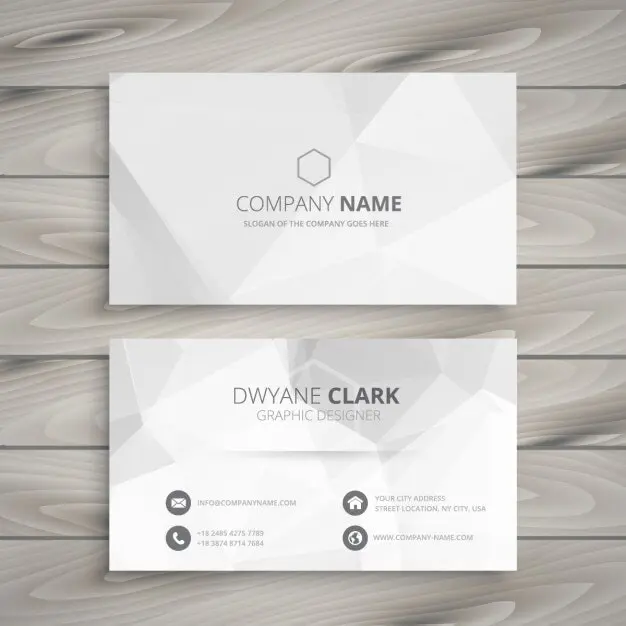

The standard business card size in the US and Canada is 3.5 x 2 inches, which is 88.9 x 50.8 mm, or 1050 x 600 pixels at 300 DPI. Design at that trim size, add an eighth of an inch of bleed on every edge, and keep anything you want readable an eighth of an inch inside the cut line.
That’s the whole answer for most people. The rest of this guide is for everyone who has had a box of 500 cards come back with the phone number sliced in half.
Sizing is the mechanical half of the job. The creative half, meaning what goes on the card, which side, and what makes someone keep it, belongs to our guide to business card ideas that earn a second look. And if you’re still weighing whether printed cards deserve a line in the budget at all, we argued that case separately in are business cards still relevant. This page sticks to measurements.
Lower your delivery costs by 23%
How we reduce costs:
- No delivery vehicle expenses
- Optimized local routes
- Pay-per-delivery model
- Average 23% delivery cost reduction
The Bottom Line
- US and Canada standard: 3.5 x 2 in (88.9 x 50.8 mm), 1050 x 600 px at 300 DPI
- Europe and the UK: 85 x 55 mm, the ISO 7810 ID-1 credit card footprint
- Japan: 91 x 55 mm, the meishi size
- Add 0.125 in (3 mm) bleed on all four sides, and keep text 0.125 in inside the trim
- Work at 300 DPI in CMYK, never 72 DPI in RGB
- Square and mini sizes vary by printer, so download their template rather than guessing
Standard business card size in inches, millimeters, and pixels
Here is the North American standard expressed three ways, because your printer, your designer and your design software each want a different unit.
| Measurement | Inches | Millimeters | Pixels at 300 DPI |
|---|---|---|---|
| Finished (trim) size | 3.5 x 2 | 88.9 x 50.8 | 1050 x 600 |
| With 1/8 in bleed | 3.75 x 2.25 | 95.25 x 57.15 | 1125 x 675 |
| Safe area | 3.25 x 1.75 | 82.55 x 44.45 | 975 x 525 |
Those bleed and safe-area figures match the specification Printing For Less publishes for standard cards, and they’re the numbers most North American print shops expect.
The finished size is what lands in someone’s hand. The bleed size is what you upload. The safe area is where your name, number and logo have to live if you want them to survive the blade.
Why 3.5 x 2 in the first place? It fits a wallet slot. Credit cards, driver’s licenses and gift cards all cluster around the same footprint for the same reason, and the whole North American printing industry is tooled for it. Deviating costs money and usually costs convenience too. An odd-sized card that won’t sit in a cardholder gets put down somewhere and lost.
Business card dimensions around the world
If you ship, source or exhibit internationally, the card you hand over in Osaka is not the card you hand over in Ohio. Per the dimensions catalogued on Wikipedia, the regional standards are:
| Region | Millimeters | Inches |
|---|---|---|
| United States and Canada | 88.9 x 50.8 | 3.5 x 2 |
| Western Europe and the UK (ISO 216 / ID-1) | 85 x 55 | 3.35 x 2.17 |
| Japan (meishi) | 91 x 55 | 3.58 x 2.17 |
| China, Hong Kong, Singapore, Malaysia | 90 x 54 | 3.54 x 2.13 |
| Australia, New Zealand, Nordic countries | 90 x 55 | 3.54 x 2.17 |
The practical upshot: European and Asian cards are shorter and taller than American ones. An American card dropped into a European cardholder rattles around; a Japanese meishi doesn’t fit a US wallet slot cleanly. If you print one run for two markets, the European 85 x 55 mm is the more forgiving compromise, because it’s closest to the credit-card format everyone’s wallet is already built around.
How to set bleed and safe area so nothing gets cut off
Cutting is mechanical, and mechanical means tolerance. A guillotine slicing through a stack of 500 cards will wander by a fraction of a millimeter, which is invisible until your background stops half a hair short of the edge and leaves a white sliver down one side.
Bleed solves that. You extend any background color, photo or graphic past the trim line by 1/8 inch (3 mm), so that when the blade wanders, it’s still cutting through your design rather than past it.
Three rules cover almost every sizing failure we’ve seen:
- Extend backgrounds to the bleed line, not the trim line. If your card has a colored or photographic background, it must run the full 3.75 x 2.25 inches. Stop at 3.5 x 2 and you’re gambling on a perfect cut.
- Pull text and logos inside the safe area. Nothing you need to read should sit within 1/8 inch of the trim. On a card this small that feels tight, and it is. That’s an argument for putting fewer things on the card, not for crowding the margin.
- Don’t add crop marks unless asked. Most online printers generate their own from your bleed. Adding a second set confuses the pre-press check and delays the job.
One quiet trap: thin borders. A 2 mm frame running around the edge of a card is the single most cut-sensitive design there is, because a drift of half a millimeter makes the left border visibly thicker than the right. If you want a border, make it generous enough that a small wander doesn’t read as a mistake.
Square, mini, and folded business card sizes
Non-standard sizes are where the “standard” stops being standard, because each printer sets its own. Two examples, both taken from the printers’ own published specs:
| Format | VistaPrint trim | MOO trim |
|---|---|---|
| Standard | 3.5 x 2 in (88.9 x 50.8 mm) | 3.5 x 2 in (88.9 x 50.8 mm) |
| Square | 2.51 x 2.51 in (63.7 mm) | 2.55 x 2.55 in (65 mm) |
| House size | — | MOO size, 3.30 x 2.16 in (84 x 55 mm) |
| Mini | — | MiniCard, 2.75 x 1.1 in (70 x 28 mm) |
Sources: VistaPrint’s dimensions page and MOO’s size guide.
The square cards differ by 1.3 mm between those two printers. That is more than enough to push text out of the safe area if you design to one spec and print with the other. So: pick the printer first, download their template second, design third. Reversing that order is how a run gets reprinted.
MOO also publishes a corner radius of 5 mm on its standard cards and 3 mm on MiniCards, which matters if you’re placing a logo near a corner, because a rounded corner eats design space that a square corner doesn’t.
Mini cards deserve a specific warning. At 2.75 x 1.1 inches there is room for a name, one contact method and a logo. Not two phone numbers, an address, a website and a QR code. If the information won’t fit, the format is telling you something.
Business card size in pixels: why DPI decides everything
Pixels are meaningless without a resolution attached, and this is the most common file error we see.
A 1050 x 600 pixel file is a sharp business card at 300 DPI and a blurry one at 72 DPI, because 1050 pixels spread over 3.5 inches is 300 per inch, while the same file exported at screen resolution covers 14.6 inches. Print is unforgiving about this in a way that screens are not.
So set resolution first, dimensions second. In Photoshop that means creating the document at 300 pixels/inch before typing 3.75 x 2.25. In Illustrator or InDesign you’re working in real-world units anyway, which is why vector tools are easier for cards: type stays crisp at any output size.
Two more file settings that have nothing to do with dimensions but ruin cards just as reliably:
- CMYK, not RGB. Screens mix light, presses mix ink. A vivid RGB blue or a neon green will convert to a duller CMYK equivalent, and it’s better to see that shift on your monitor than on 500 printed cards.
- Embed or outline your fonts. A PDF that references a font your printer doesn’t own gets substituted silently. Outlining type removes the risk entirely.
Using MOO’s published full-bleed figures as a cross-check: their standard card wants 1098 x 648 pixels at 300 PPI. VistaPrint’s bleed area works out to 1083 x 633 px. Same card, different printer, different upload. Another reason the template beats the guess.
Card thickness, weight, and orientation
Size isn’t only the two dimensions on the face. Two other specs change how a card feels and how it survives.
Thickness is quoted in points (pt) or pounds (lb). Standard stock runs around 14 pt; 16 pt is noticeably stiffer; 32 pt is the thick, luxury-feeling card that costs several times as much. Thickness has no effect on your artboard dimensions, but it does affect cost and it does affect how a card fares in a coat pocket for three weeks. Print runs are also one of those small recurring expenses that belong on a dedicated business account rather than a personal one. Our walkthrough of getting a business credit card with an EIN covers how to set that up without a personal credit check.
Orientation is a free choice. A vertical (portrait) 2 x 3.5 card uses exactly the same dimensions rotated, and it stands out for that reason alone, because most people expect landscape. It also narrows your line length considerably, so it suits a short name and one contact method better than a dense card.
Sizing a card that travels in a delivery box
Most sizing advice assumes the card is handed over at a networking event. For a bakery, florist, caterer or wholesaler running local deliveries, most cards never get handed to anyone. They ride out in the box and get found later, on a counter, by someone who wasn’t there when the order arrived. The same goes for anyone selling direct off a farm: if you’re starting a farm business with a CSA box or a wholesale route, the card in the crate is often the only branded thing the end customer ever holds. Deluxe Catering in Philadelphia runs on the same principle: its catering deliveries across the city arrive at offices and events where nobody from the kitchen is present to introduce the brand.
That changes two sizing decisions:
- Stay standard. A card that’s found in packaging needs to end up in a wallet or on a fridge, not in the recycling because it doesn’t fit anything. 3.5 x 2 is the size every cardholder, wallet slot and magnetic clip is built for.
- Go thicker than you would for a pocket card. A card in a pastry box or a floral sleeve meets condensation, grease and the weight of the product. 16 pt stock with a matte or soft-touch coating survives that; 14 pt uncoated often doesn’t.
If there’s a QR code on it, size that deliberately too: keep the code at least 0.8 x 0.8 inches, with clear space around it, and test a scan from the printed card rather than the screen proof. A code shrunk to fit a crowded layout is a code that fails at arm’s length in a dim kitchen.
Common business card size mistakes
- Designing at trim size with no bleed. The most frequent rejection reason at every online printer.
- Working in RGB at 72 DPI because the file came out of a web design tool. It’ll look fine on screen and soft on paper.
- Using a generic template with a different printer. The square-card gap above is 1.3 mm, and that’s enough.
- Filling the safe area to the edge. White space is not wasted space on a 3.5 inch canvas; it’s what makes the phone number findable.
- Choosing an odd size to seem memorable. It’s memorable for about four seconds, then it doesn’t fit the cardholder and gets binned.
Frequently asked questions
What is the standard business card size? 3.5 x 2 inches in the US and Canada, which is 88.9 x 50.8 mm or 1050 x 600 pixels at 300 DPI.
What size is a business card in mm? 88.9 x 50.8 mm in North America, 85 x 55 mm across Western Europe and the UK, and 91 x 55 mm in Japan.
How much bleed does a business card need? 1/8 inch (3 mm) on each of the four edges, giving an upload size of 3.75 x 2.25 inches. Keep text 1/8 inch inside the trim line.
What size should a business card be in pixels? 1050 x 600 px at trim and 1125 x 675 px with bleed, both at 300 DPI. Check your printer’s own template first, because published bleed areas vary by a few pixels between companies.
Can I print a vertical business card? Yes. Rotate the same dimensions to 2 x 3.5 inches. Bleed and safe-area rules are unchanged.
Is a square business card a good idea? It stands out and it photographs well, but it costs more, it doesn’t fit a standard wallet slot, and the trim size differs between printers. Worth it for a design-led brand, not worth it for a card that mainly goes in delivery boxes.
Getting business card size right the first time
Business card sizing rewards being boring. Take 3.5 x 2 inches, add the bleed, respect the safe area, work at 300 DPI in CMYK, and download the template from the printer you have chosen. Do that and the cutting stage becomes a non-event, which is exactly what it should be.
Then spend your attention on the part that decides whether anyone keeps the card at all: the layout, the hierarchy and the one action you want the reader to take.