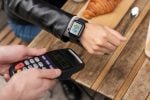
A driver is standing at a side door with sixty dollars of pastry and no card reader. The customer is holding a phone. In most cases, that’s already enough to get paid, and the reason is that the reader can be the driver’s phone too.
NFC contactless payments are the tap. Not the whole payment stack, not the terminal, not the checkout page: the specific moment where a card or a phone comes near a reader and money starts moving. Understanding that moment is worth doing properly, because almost every practical question a delivery business has, whether that’s doing this without buying hardware, what the limit is, or what happens with no signal, is really a question about how the tap works.
This post stays on the tap and the software-only route around it. If you’re trying to decide when to collect money for a delivered order in the first place, that’s the subject of the guide to contactless payments for deliveries. If you’ve concluded you want dedicated hardware, start with the contactless payment machine buying guide, or the Clover device line-up if that’s the ecosystem you’re already in.
The Bottom Line
- NFC is short-range radio. The card or phone has to be within about two inches of the reader, which is why a tap is a deliberate gesture and not something that happens by accident in a pocket.
- Nothing real is transmitted. The reader receives a single-use token, not the card number, which is what makes a tap safer to take at a doorstep than a card you’d have to key in.
- You probably don’t need to buy anything. Software-only tap-to-pay turns a supported phone into the reader at no hardware cost and no rate premium.
- Physical contactless cards can carry issuer limits, often around $100 to $250, above which the customer has to insert instead. Phone wallets usually aren’t capped the same way.
- The real delivery constraint isn’t the tap, it’s connectivity and battery. Test both at your worst address before you depend on them.
Lower your delivery costs by 23%
How we reduce costs:
- No delivery vehicle expenses
- Optimized local routes
- Pay-per-delivery model
- Average 23% delivery cost reduction
How an NFC contactless payment actually works
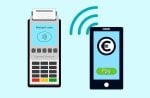
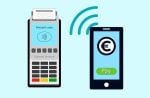
NFC stands for near-field communication, and the “near” is the important part. It operates on a specific RFID frequency, 13.56 MHz, and the customer’s card or device has to come within about two inches of the reader for anything to happen (Square).
What crosses that two inches is not the card number. The network replaces the real account details with a single-use digital stand-in, and that token is what travels to the processor for authorization, over the same card networks as any other card payment (Worldpay). The data is encrypted and changes with every transaction.
Two consequences for a delivery business, and they both cut in your favour:
- A tap at a doorstep leaks less than a card handed over. There’s no number for anyone to copy, including your own driver.
- A tap is quick enough to not slow a route. Worldpay puts NFC transactions at typically under two seconds and up to 60% faster than chip-based payments. Visa describes the tap itself as one to two seconds (Visa).
Tapping is also no longer a behaviour you have to teach anyone. Contactless accounts for more than 75% of all transactions on Mastercard’s global network, and tap-to-pay volumes have grown fivefold since 2020 (Worldpay). In the US specifically, Visa reported tap to pay passing 60% of its domestic face-to-face transactions for the first time in its fiscal quarter through April 21, 2025 (PYMNTS).
What a customer can tap with
Anything with an NFC antenna and a payment credential in it:
- A contactless card. The wave symbol on the front means there’s an antenna inside.
- A phone wallet. Apple Pay, Google Pay and Samsung Pay all work on iPhone 7 and newer, and on most modern Android devices (Square).
- A watch or band. Same mechanism, smaller antenna, same outcome.
For a driver, the practical version of this is simpler: if the customer is holding a phone or a card, assume it taps and let them try. The failure mode is harmless: nothing happens and they insert instead.
Turning a driver’s phone into the card reader
This is the part most delivery businesses underuse. Tap-to-pay software turns a phone you already own into the contactless reader, with no separate hardware in the loop.
The economics are unusually clean. There’s no hardware cost because you’re using an existing phone, and the processing fee is the same card-present rate as the rest of your account, so you aren’t paying a premium to go hardware-free (SwipeSimple). Worldpay describes its equivalent as a software solution that turns a compatible iPhone into a payment terminal without a card reader.
Requirements vary by provider, so check your own processor rather than assuming. As one concrete example, Square lists these for Tap to Pay on iPhone (Square):
- An iPhone XS or newer
- A current version of iOS
- A passcode set and required on the phone
- A stable internet connection, because offline payments aren’t supported
SwipeSimple’s guide puts the floor at any iPhone that supports iOS 17.4 or higher, and notes that iPads can’t use the feature (SwipeSimple). Android tap-to-pay exists through several processors on similar terms. The pattern holds across all of them: recent device, current OS, screen lock enabled, live connection.
That last requirement is the one that bites on a delivery route, and it’s worth sitting with before you commit.
Tap limits: when a customer has to insert the card instead
There’s no universal legal ceiling on a contactless payment in the US, but there are limits, and they work differently for cards and phones.
Physical contactless cards can carry limits set by the card issuer, often somewhere in the $100 to $250 range, above which the customer has to insert the card rather than tap (SwipeSimple). The exact threshold varies by card and by country, which means you cannot promise a customer in advance that their card will tap for a given amount.
Phone wallets generally aren’t bound by the same ceiling, because the phone has already verified the customer with a face scan, a fingerprint or a passcode before releasing the token. Processors set their own upper bounds well above anything a delivery would hit. Square, for instance, lists a per-transaction limit of $50,000 for contactless payments and $10,000 for physical contactless cards (Square).
For a delivery operation, the practical rule falls out of this:
- Small residential orders: a tap will almost always work, card or phone.
- Large catering or wholesale orders handed over at a door: assume a physical card may refuse to tap. Either make sure the driver can accept an inserted chip card, or collect that order a different way.
A driver standing in a loading bay with a $600 invoice and a tap-only phone is a solved problem, but only if you solved it before dispatch.
What happens when a tap fails at the delivery address
Three failure modes, in rough order of how often they actually happen.
No signal. Phone-based tap-to-pay typically needs a live connection. Square states plainly that offline payments aren’t supported with Tap to Pay on iPhone. Basements, freight elevators, loading docks behind concrete and rural addresses all produce this. Some dedicated terminals handle it differently: several can store a transaction and forward it on reconnect, and several carry their own cellular radio. That is one of the stronger arguments for hardware over software on certain routes.
Dead battery. A phone that’s been navigating for five hours is not a reliable payment terminal at stop eleven. One power bank per vehicle removes this permanently.
Card over its tap limit. Covered above. The customer inserts, or you fall back to a payment link.
The fix for all three is the same shape: never let the only route to payment be a single device. A payment link you can text from any phone is the cheapest backup there is, and it works when the reader doesn’t. If you’d rather hand over something physical, the same link can be printed as a scannable code, and this guide to choosing a QR code generator covers what to look for in the tool that makes it.
What NFC contactless payments cost compared to chip and keyed payments
A tap is not a separate pricing category. It’s a card-present transaction, and it prices like one.
That matters because the expensive alternative isn’t chip, it’s keyed entry. Taking a card number over the phone and typing it in is card-not-present, and it carries a meaningfully higher rate. To give one published example, the Clover reseller VMS lists Fiserv direct rates of 2.3% + $0.10 for card-present transactions against 3.5% + $0.10 for card-not-present or keyed (VMS, retrieved October 2026). Your own rates will differ; the gap between the two columns is the part that generalizes.
So the cost argument for putting a tap-capable device in a driver’s hand isn’t really about tap versus chip. It’s about tap versus phoning the office to key a card in, which is what happens otherwise.
Is a phone enough, or do you need a terminal?
Start with the phone. It costs nothing to try, it uses the rate you already have, and for a lot of delivery businesses it’s the end of the question.
Move to dedicated hardware when one of these is true:
- Your drivers regularly deliver somewhere with no signal.
- Customers expect a printed receipt at the door.
- You need a device that survives a full shift without charging.
- You’re handing over order values where a physical card’s tap limit is a routine obstacle.
Most modern payment terminals already include NFC. Worldpay notes that a terminal bought or leased in the last few years likely has it built in, so if you already own one, the capability may be sitting there unused. Choosing a new one is its own decision, with connectivity, battery and contract terms doing most of the work; that’s covered in the contactless payment machine guide.
Frequently asked questions
What is the difference between NFC and contactless payments?
NFC is the technology; contactless payment is what you do with it. Every tap-to-pay transaction on a card, phone or watch is running over NFC at 13.56 MHz, so in everyday use the two terms describe the same thing from different angles.
Do I need special NFC hardware to accept tap payments?
Often not. Most terminals sold in recent years ship with NFC built in, and if you’d rather not buy hardware at all, software-only tap-to-pay turns a supported phone into the reader. The thing to check is your processor’s device and OS requirements, which differ between providers.
Are NFC payments safe to take at a customer’s door?
They’re generally safer than the alternatives available at a doorstep. The reader receives an encrypted single-use token rather than the card number, so there’s nothing for anyone to copy, including the person holding the reader. That’s a better position than reading a card number aloud over a phone.
Why did a customer’s card not tap for a large order?
Almost certainly an issuer-set contactless limit on that physical card. Above the threshold, the card expects to be inserted so the transaction can be verified differently. The customer’s phone wallet, if they have one set up, usually isn’t limited the same way.
Can a driver take an NFC payment with no internet connection?
With a phone-based reader, usually no. Most implementations require a live connection and Square explicitly doesn’t support offline Tap to Pay on iPhone. Some dedicated terminals can queue a transaction and submit it later, and some have their own cellular connection. If your routes include dead zones, test this specifically rather than assuming.
Try it on one route before you buy anything
The useful next step is small: enable tap-to-pay on one driver’s phone, send them out on a normal route, and see what breaks. You’ll learn more about whether you need hardware from four real doorsteps than from any spec sheet, and the test costs you nothing but an afternoon.